Reverse Engineering AnyDesk
Reverse engineering AnyDesk 9.7.0: unpacking its Windows binary, tracing DPAPI and Frida hooks, and analyzing the AnyNet protocol and password hashing.

Responsible Disclosure Notice: Everything here was done on my own licensed installation, on my own hardware. Credentials and keys shown are from my test environment and have been rotated. No third-party systems were accessed.
I spent a weekend digging into AnyDesk 9.7.0, not out of spite (I use it daily), but because reversing real-world binaries is where things get interesting: custom protocols, weird edge cases, anti-debug tricks, and all the little implementation details you never see in CTFs 😉
This post documents the full journey
Tools used:
- Python + pefile + Capstone
- x32dbg
- Frida
- Process Monitor
- Detect It Easy
- Some C/C++ knowledge and a lot of patience
Reconnaissance
DiE
Before touching a debugger, I always start with Detect It Easy. It gives you a quick overview of what you’re dealing with: compiler, packer, protections, and some heuristics about the binary structure.
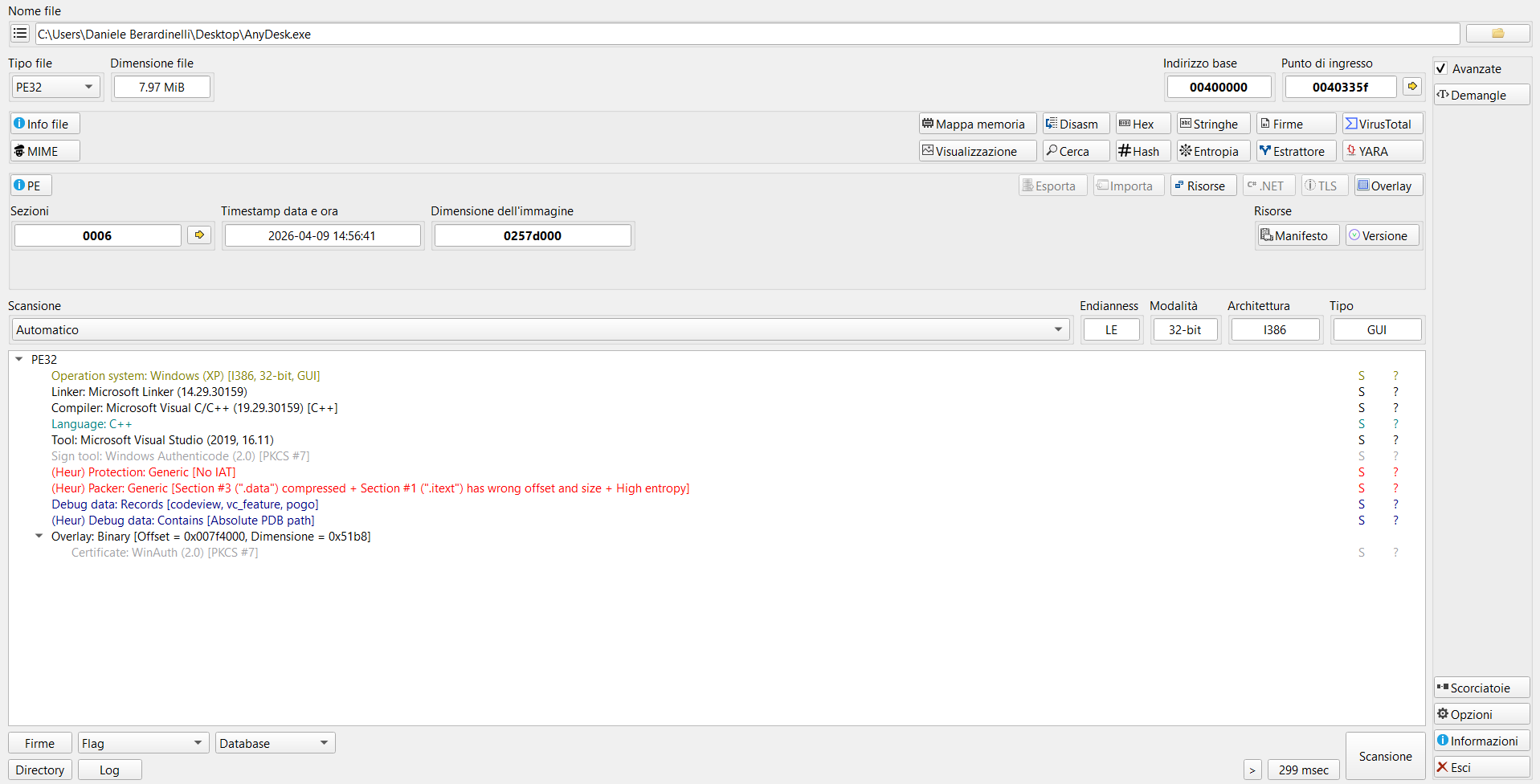
DiE immediately flags two things:
1
2
3
(Heur) Packer: Generic [Section #3 (".data") compressed +
  Section #1 (".itext") has wrong offset and size + High entropy]
(Heur) Protection: Generic [No IAT]
The first flag tells us the binary is packed,.data has suspicious entropy and .itext has a size mismatch between its raw and virtual sizes. The second flag says there’s no standard IAT, which means the real imports are resolved at runtime after unpacking.
DiE also identifies the compiler and toolchain:
1
2
3
4
Compiler: Microsoft Visual C/C++ (19.29.30159) [C++]
Linker: Microsoft Linker (14.29.30159)
Tool: Microsoft Visual Studio (2019, 16.11)
Sign tool: Windows Authenticode (2.0) [PKCS #7]
So, we’re looking at a C++ application compiled with VS 2019, signed with Authenticode.
Binary details
1
2
3
4
5
6
7
File: AnyDesk.exe
Size: 8.042.496 bytes
SHA256: 2ac2da18754e34bb6bab866ebba03a741a487648aadda7b25d88e2b2b5fa8df6
Arch: PE32 (i386), GUI subsystem
Image: 0x0257D000 bytes virtual
Entry: 0x0040335F
Sections: 6
The PDB path leaked in the debug data directory tells us quite a bit about AnyDesk’s build infrastructure:
workeris a CI/CD build agent usernameAD_windows32is a workspace name, separating 32 bit buildswin_9.7.0is the version branch6969just the build numberwin_loader\Staticit’s the binary type (a static loader)
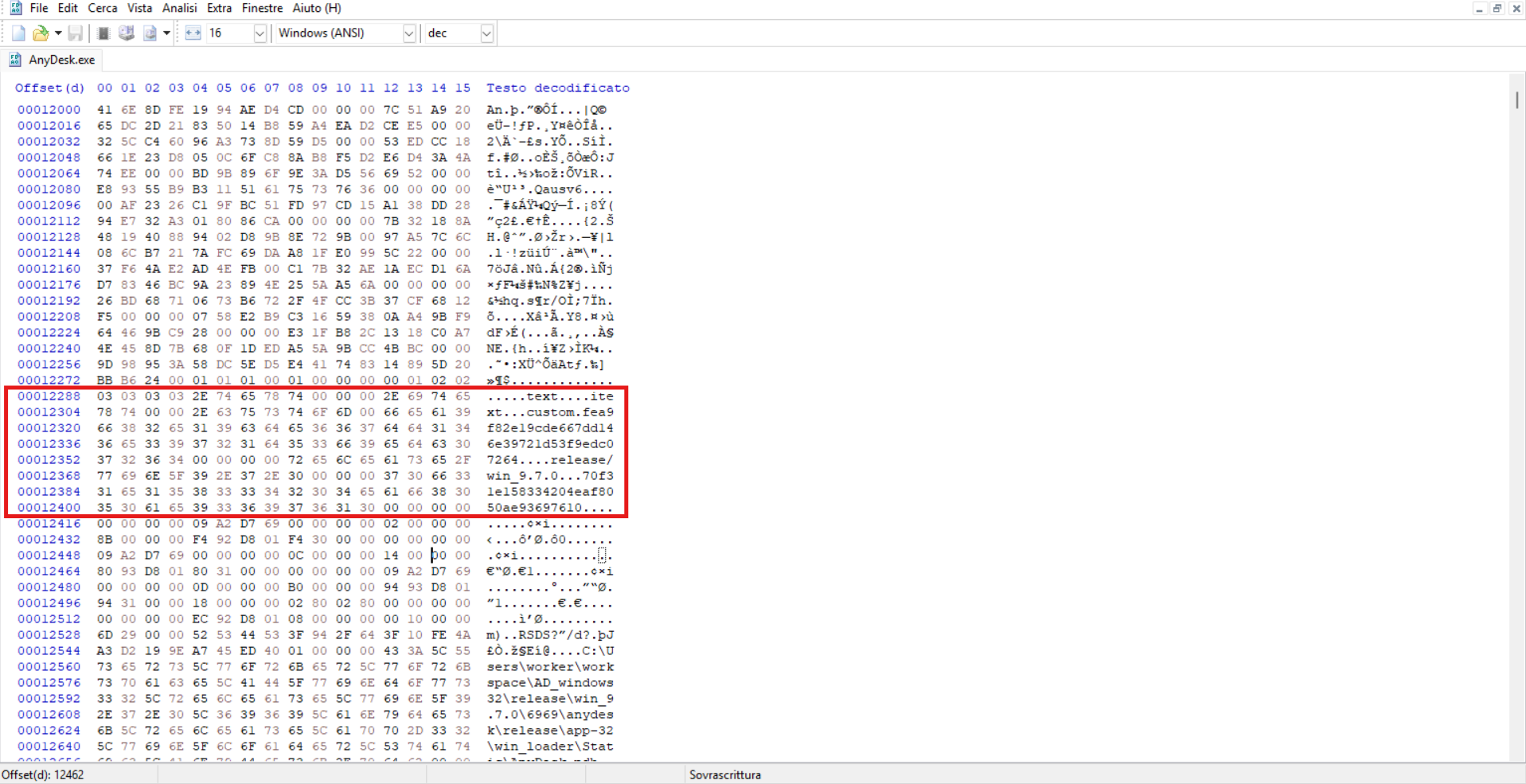
The PDB explicitly says this is a loader, not the real application. As expected, AnyDesk code is packed inside.
Section table analysis
I wrote a quick script to analyze the sections:
1
2
3
4
5
6
7
8
9
10
11
12
import pefile

pe = pefile.PE('AnyDesk.exe')
for s in pe.sections:
    name = s.Name.decode().strip('\x00')
    raw  = s.SizeOfRawData
    virt = s.Misc_VirtualSize
    ratio = virt / max(raw, 1)
    entropy = s.get_entropy()
    print(f"{name:10s} raw=0x{raw:08X} ({raw:>10,} B)"
          f"virt=0x{virt:08X} ({virt:>10,} B)"
          f"ratio={ratio:8.1f}x  entropy={entropy:.2f}")
Output:
1
2
3
4
5
6
.text       raw=0x00000C00 (      3,072 B)  virt=0x00000AB2 (      2,738 B)  ratio=     0.9x  entropy=5.98
.itext      raw=0x00000200 (        512 B)  virt=0x01D85000 (30,834,688 B)  ratio= 60,936.0x  entropy=0.19
.data       raw=0x007B3A00 ( 8,075,776 B)  virt=0x007B3A00 ( 8,075,776 B)  ratio=     1.0x  entropy=7.99
.rdata      raw=0x00BF2C00 (12,594,176 B)  virt=0x00BF2A74 (12,593,780 B)  ratio=     1.0x  entropy=6.52
.reloc      raw=0x00001E00 (      7,680 B)  virt=0x00001C24 (      7,204 B)  ratio=     0.9x  entropy=5.75
.rsrc       raw=0x00029800 (    170,496 B)  virt=0x00029680 (    169,600 B)  ratio=     1.0x  entropy=3.95
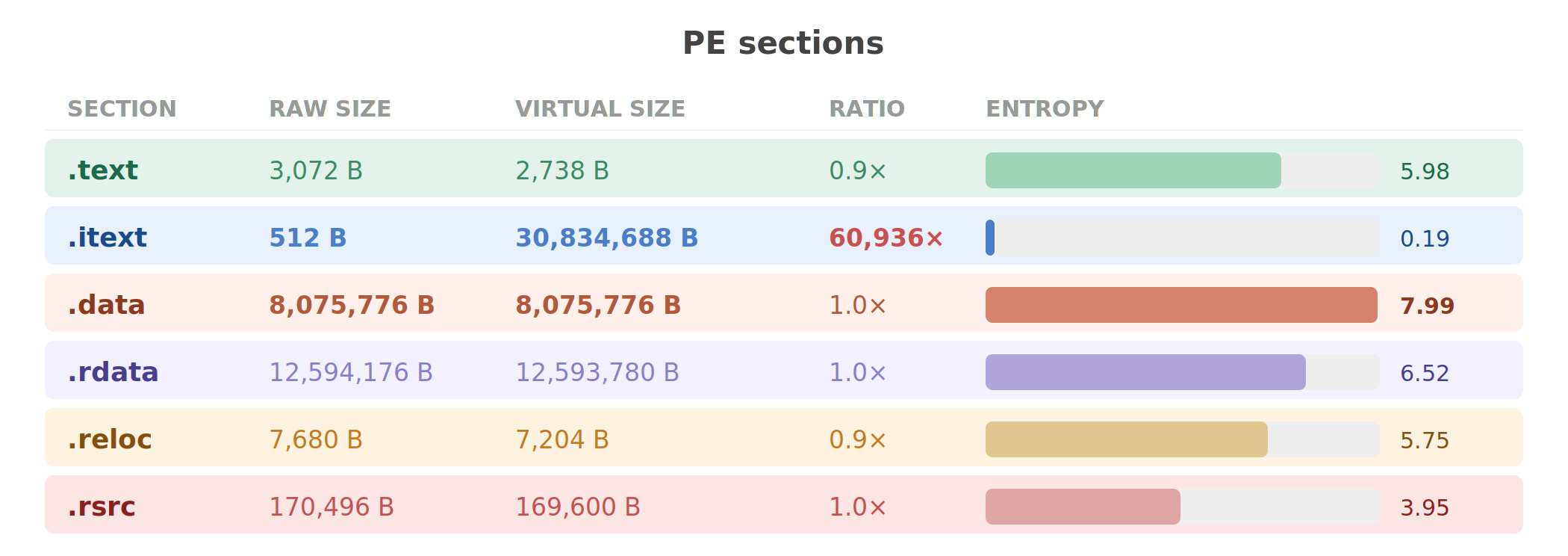
Three numbers to look:
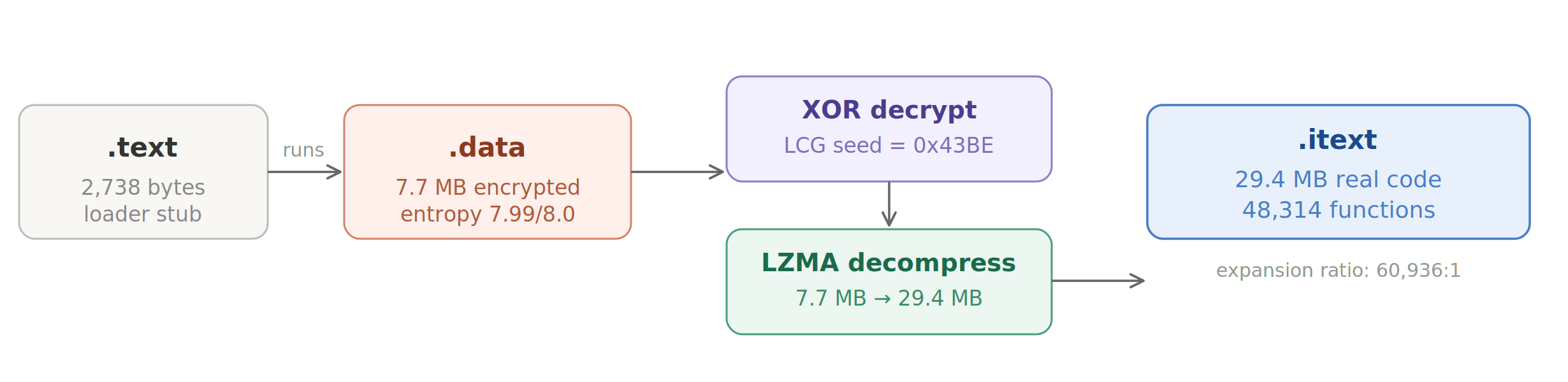
.itext: 512 bytes raw, so 30,834,688 bytes virtual. On disk, this section is essentially empty (512 bytes of padding). At runtime, it expands to nearly 30 MB. This is the decompression target, where the real code will live after the unpacking process..data: 8,075,776 bytes at entropy 7.99. Maximum possible entropy for random data is 8.0 bits per byte. 7.99 means this section is either encrypted or compressed with very high efficiency. This must be the encrypted payload, right?.text: Only 2,738 bytes of actual code. This tiny section is the loader stub, which means that this is the only code that runs on disk. Its job is to decrypt.dataand decompress it into.itext.
Unpacking the binary
x32dbg
I loaded AnyDesk.exe in x32dbg and started tracing from the entry point. The first thing I noticed is that the entry point (0x0040335F) is in .text, the tiny loader section.
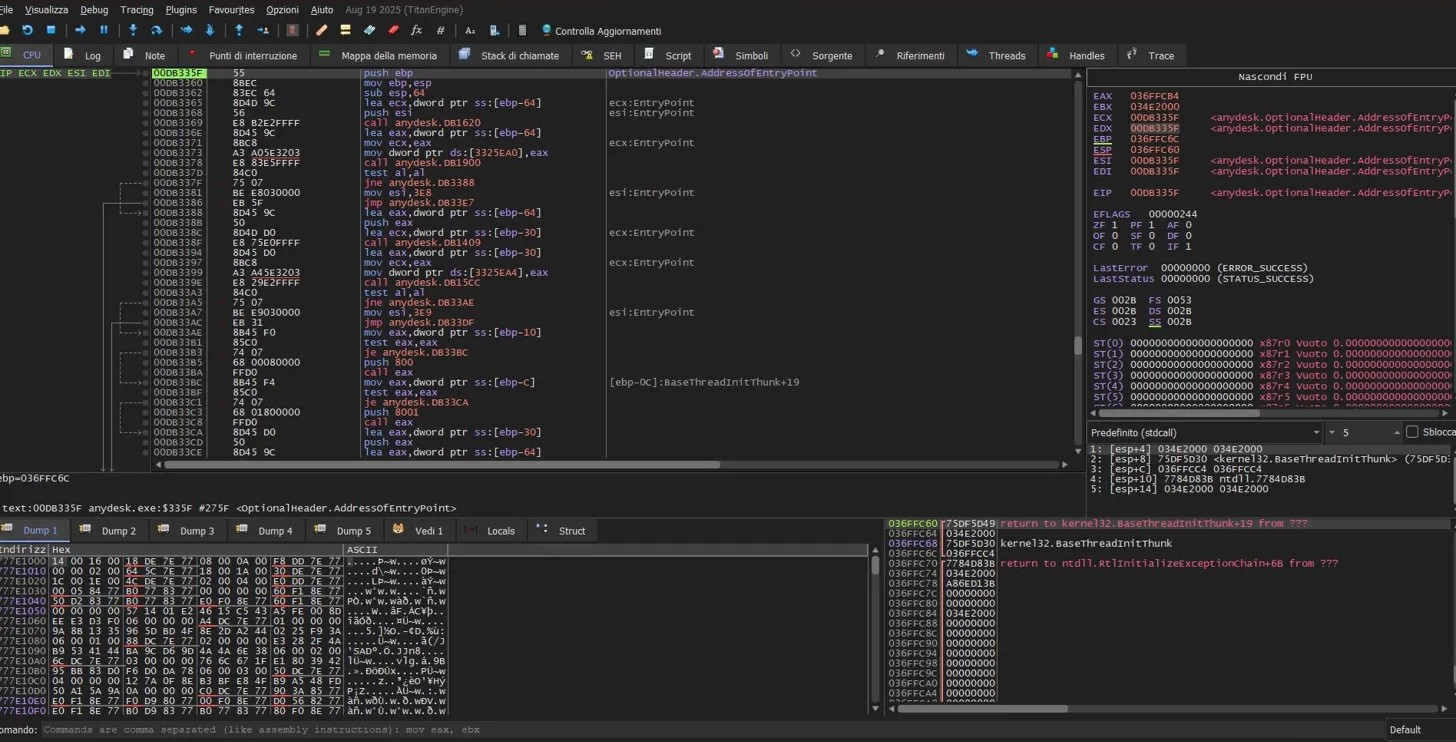
The loader is simple, about 2KB of code. It does exactly two things:
- XOR-decrypts the
.datasection using a keystream from a Linear Congruential Generator - LZMA-decompresses the decrypted data into the
.itextsection
XOR decryption with LCG PRNG
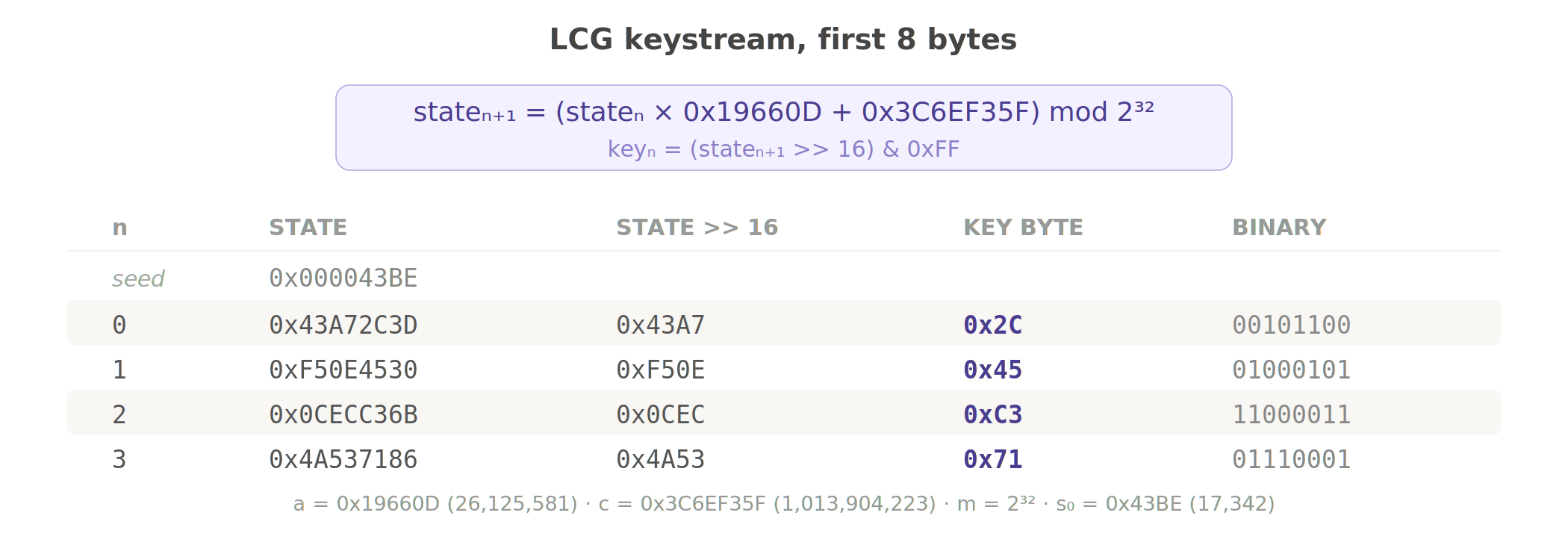
The decryption loop iterates over every byte of .data, XORing it with a key byte generated by a Linear Congruential Generator. The LCG uses the exact same constants as Microsoft’s CRT rand() function:
1
2
3
state₀ = 0x43BE
stateₙ₊₁ = (stateₙ × 0x19660D + 0x3C6EF35F) mod 2³²
keyₙ = (stateₙ >> 16) & 0xFF
If you hate math, now it’s the right time to learn it😀, but trust me it’s not that hard:
- Multiplier
a = 0x19660D - Increment
c = 0x3C6EF35F - Modulus
m = 2³² - Seed
s₀ = 0x43BE
The LCG has a period of 2³², but that doesn’t matter for security because the seed is hardcoded, so every copy of AnyDesk 9.7.0 uses the exact same keystream. This is obfuscation to slow down casual analysis, not real cryptography.
Here is the Python implementation:
1
2
3
4
5
6
7
def decrpyt_xor(data: bytes, seed: int = 0x43BE) -> bytes:
    state = seed
    out = bytearray(len(data))
    for i in range(len(data)):
        state = (state * 0x19660D + 0x3C6EF35F) & 0xFFFFFFFF
        out[i] = data[i] ^ ((state >> 16) & 0xFF)
    return bytes(out)
To check if this is correct, I checked the first few key bytes against the decrypted output from x32dbg’s memory dump:
1
2
3
4
5
state = 0x43BE
for i in range(8):
    state = (state * 0x19660D + 0x3C6EF35F) & 0xFFFFFFFF
    key = (state >> 16) & 0xFF
    print(f" key[{i}] = 0x{key:02X})
1
2
3
4
5
6
7
8
key[0] = 0x2C
key[1] = 0x45
key[2] = 0xC3
key[3] = 0x71
key[4] = 0xF5
key[5] = 0xAC
key[6] = 0x15
key[7] = 0x14
These matched the runtime memory exactly, so I’m not wrong.
LZMA decompression
After XOR decryption, the payload is a standard LZMA compressed stream. Python’s lzma module handles the decompression:
1
2
3
4
5
6
7
8
9
10
11
12
13
import lzma, struct

def decompresspayload(decrypted: bytes) -> bytes:
    props = decrypted[:5]
    uncompressed_size = struct.unpack('<Q', decrypted[5:13])[0]
    print(f"uncompressed size: {uncompressed_size:,} bytes"
          f"(0x{uncompressed_size:X})")
    compressed = decrypted[13:]
    decompressor = lzma.LZMADecompressor(
        format=lzma.FORMAT_RAW,
        filters=[{'id': lzma.FILTER_LZMA1}]
    )
    return decompressor.decompress(compressed)
The decompressed output is 0x1C09000 of raw x86 machine code. This is the real AnyDesk binary.
Building the unpacked PE
I reconstructed the full PE by:
- copying the original PE headers and non-code sections
- patching
.itextwith the decompressed code - fixing the section header
- keeping
.rdata,.reloc,.rsrcintact
The result is a valid PE that loads in any analysis tool:
That’s a quick recap of the PE sections:
OpenSSL

Maybe it’s time to update.
Static analysis
Import Table
1
2
3
4
5
6
7
8
9
10
11
12
pe = pefile.PE('AnyDesk_unpacked.exe')
pe.parse_data_directories(
    directories=[pefile.DIRECTORY_ENTRY['IMAGE_DIRECTORY_ENTRY_IMPORT']])

iat = {}
for entry in pe.DIRECTORY_ENTRY_IMPORT:
    dll = entry.dll.decode()
    count = len([i for i in entry.imports if i.name])
    print(f" {dll:30s} {count} imports")
    for imp in entry.imports:
        if imp.name:
            iat[imp.address] = imp.name.decode()
1
2
3
4
5
6
7
8
KERNEL32.dll: 187 imports
USER32.dll: 89 imports
GDI32.dll: 47 imports
ADVAPI32.dll: 39 imports
SHELL32.dll: 19 imports
CRYPT32.dll: 12 imports
WS2_32.dll: 10 imports
OLEAUT32.dll: 9 imports
Process creation and privilege manipulation:
| API | call sites | what it does |
|---|---|---|
CreateProcessAsUserW | 4 | service creates processes in the user’s session |
DuplicateTokenEx | 8 | clones tokens for impersonation |
ImpersonateLoggedOnUser | 8 | runs code as the logged in user |
ShellExecuteExW | 9 | launches external processes |
ShellExecuteW | 1 | printer driver installation |
Cryptography:
| API | call sites | what it does |
|---|---|---|
CryptProtectData | 1 | DPAPI encryption |
CryptUnprotectData | 1 | DPAPI decryption |
CryptGenRandom | 6 | random number generation |
CryptAcquireContextW | 2 | crypto context initialization |
Other:
| API | call sites | what it does |
|---|---|---|
SetSecurityInfo | 2 | sets ACLs on objects (it doesn’t work though) |
LoadLibraryW | 40 | dynamic DLL loading |
RegSetValueExW | 17 | registry modification |
PathCanonicalizeW | 2 | path normalization |
SendMessageW | 516 | GUI message dispatching |
What should be imported
1
2
3
4
5
WinVerifyTrust
CryptVerifySignature
CertVerifyCertificateChainPolicy
SetDefaultDllDirectories
SetDllDirectoryW
zero code signing verification APIs. It’s not imported, not even present as strings for dynamic resolution. AnyDesk never verifies Authenticode signatures on anything.
Function(s)
I obviously can’t read 49,037 functions one by one. So the approach is to scan every function prolog, then for each function cross-reference which IAT entries it calls and what string constants it pushes. This should give you a rough category for each function without reading a single instruction manually. After profiling, you start to see the architecture emerge.
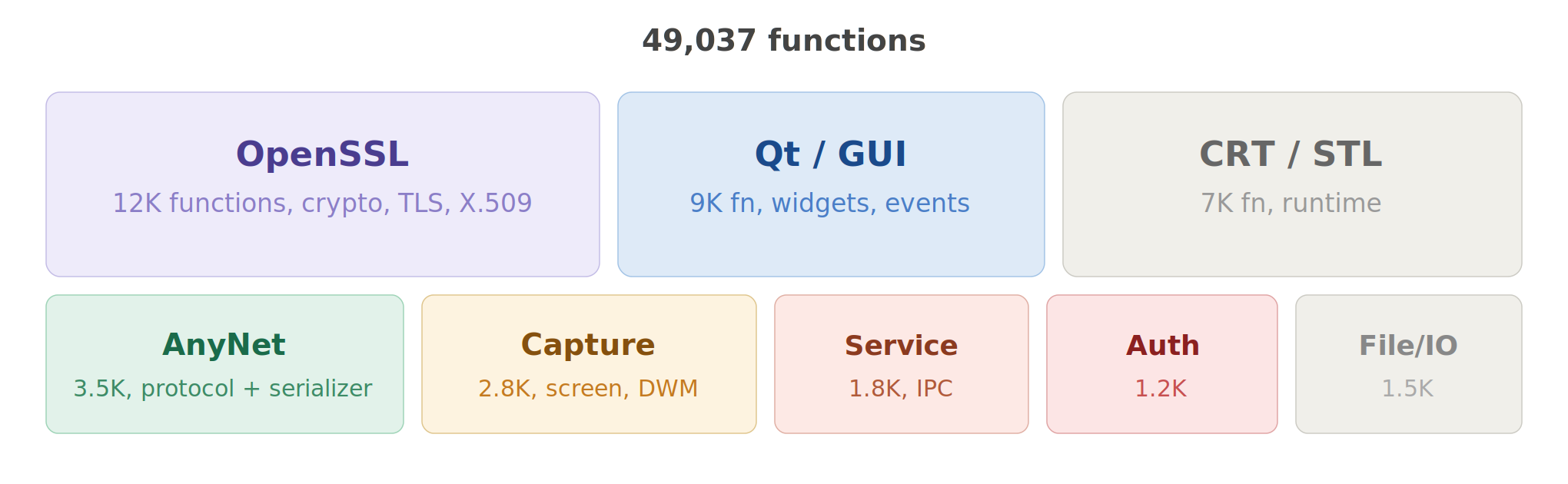
The binary is roughly a quarter OpenSSL (nearly 12K functions, identified by assertion strings referencing crypto/*.c and ssl/*.c), a fifth Qt framework (GUI, widgets, event handling, the 516 SendMessageW calls live here), and the rest splits between CRT/STL boilerplate, the AnyNet protocol implementation, screen capture/rendering, and the service/IPC layer.
The functions I spent the most time on:
| address | size | what it does | why I cared |
|---|---|---|---|
0x102FB550 | large | serialization engine | 570+ bounds checks, processes all incoming protocol data |
0x108F9970 | 5 KB | CLI argument parser | handles --set-password, --with-password, --install, 40+ flags |
0x101F68D0 | 2 KB | HRESULT error mapper | revealed 30 error codes and 8 HRESULT values, mapped the protocol error system |
0x10ACF350 | 2.5 KB | shared memory manager | CreateFileMappingW with NULL security attributes |
0x10812770 | 1.5 KB | CreateProcessAsUserW | service creates user-session processes |
0x10A383E0 | 1 KB | SetSecurityInfo wrapper | the function that fails silently with PRIVILEGE NOT HELD |
0x108038C0 | 1.1 KB | URL handler registration | registers anydesk:// protocol |
0x10A481E0 | 1.5 KB | screen capture allocator | creates capture_pool_%u_shm objects |
Dynamic Analysis
Runtime
With x32dbg attached, I could observe the runtime memory layout:
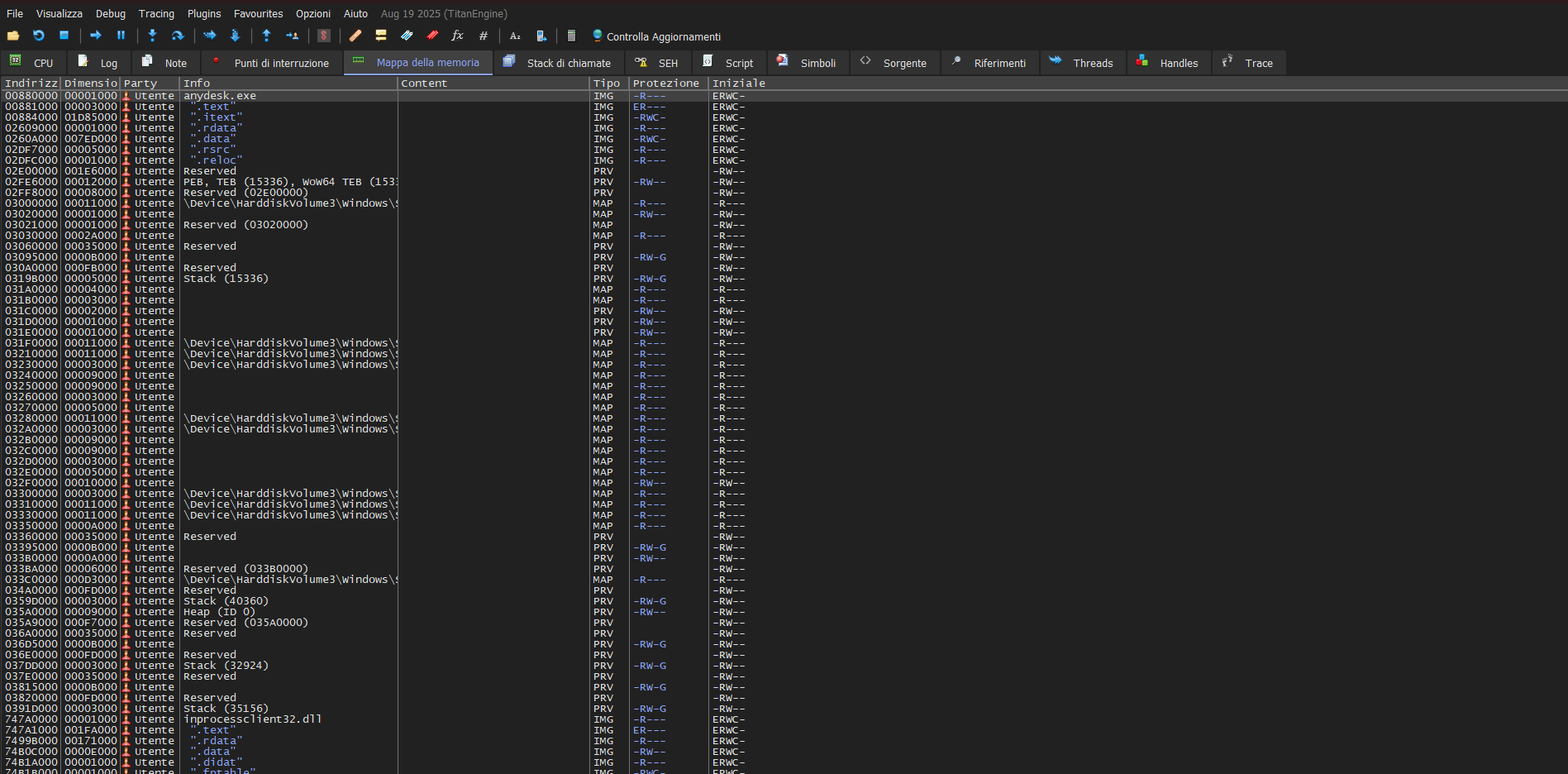
The entire .itext section is marked RWC (Read/Write/Copy, which means Read/Write/Execute). No DEP on the code section. I’m thinking that this is probably required for the unpacker to write the decompressed code, but it means all 30MB of code pages remain writable at runtime.
Frida
I used Frida to hook into AnyDesk at runtime and intercept cryptographic operations. Frida lets you inject JavaScript into a running process, which is perfect for tracing DPAPI calls without modifying the binary.
Setting up the hooks
1
2
3
4
5
6
7
8
9
10
11
12
13
14
15
16
17
18
19
20
21
22
23
24
25
26
27
28
29
30
31
32
33
34
35
36
37
38
39
40
41
42
43
44
45
46
47
48
49
50
51
52
53
54
55
56
57
58
59
60
61
// this is the script I made with javascript
Interceptor.attach(
    Module.findExportByName('crypt32.dll', 'CryptUnprotectData'),
    {
        onEnter(args)
        {
            const blobPtr  = args[0].readPointer();
            const blobSize = args[0].add(4).readU32();
            const entropyStruct = args[4];
            if (!entropyStruct.isNull())
            {
                const ePtr  = entropyStruct.readPointer();
                const eSize = entropyStruct.add(4).readU32();
                const entropy = ePtr.readUtf8String(eSize);
                console.log(`CryptUnprotectData`);
                console.log(`input: "${blobSize}" bytes`);
                console.log(`entropy: "${entropy}" (${eSize} bytes)`);
            }
            else
            {
                console.log(`CryptUnprotectData`);
            }

            const flags = args[5].toInt32();
            if (flags & 0x1)
                console.log(`flags: CRYPTPROTECT_UI_FORBIDDEN`);
            this.pDataOut = args[6];
        },


        onLeave(retval)
        {
            if (retval.toInt32())
            {
                const outPtr = this.pDataOut.readPointer();
                const outSize = this.pDataOut.add(4).readU32();

                console.log(`output: ${outSize} bytes`);
                if (outSize < 200)
                {
                    console.log(`data: ${hexdump(outPtr, { length: outSize })}`);
                }
            }
            else
            {
                console.log(`errore:${this.context.eax}`);
            }
        }
    }
);

Interceptor.attach(
    Module.findExportByName('crypt32.dll', 'CryptProtectData'),
    {
        onEnter(args)
        {
            const size = args[0].add(4).readU32();
            console.log(`CryptProtectData: ${size} bytes`);
        }
    }
);
Running it:
1
frida -f "AnyDesk.exe" -l anydesk_frida.js -o anydesk.log
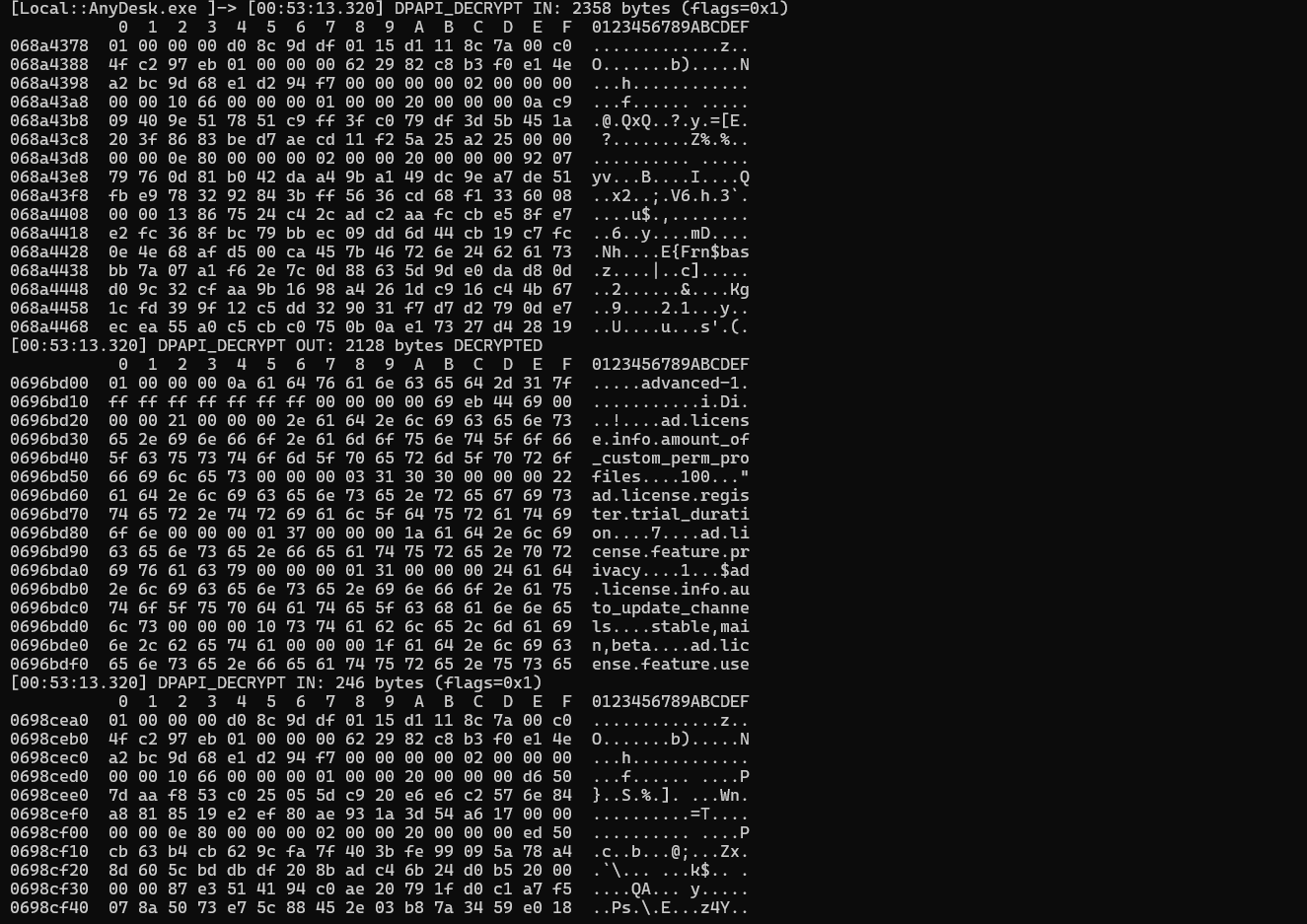
What DPAPI actually does
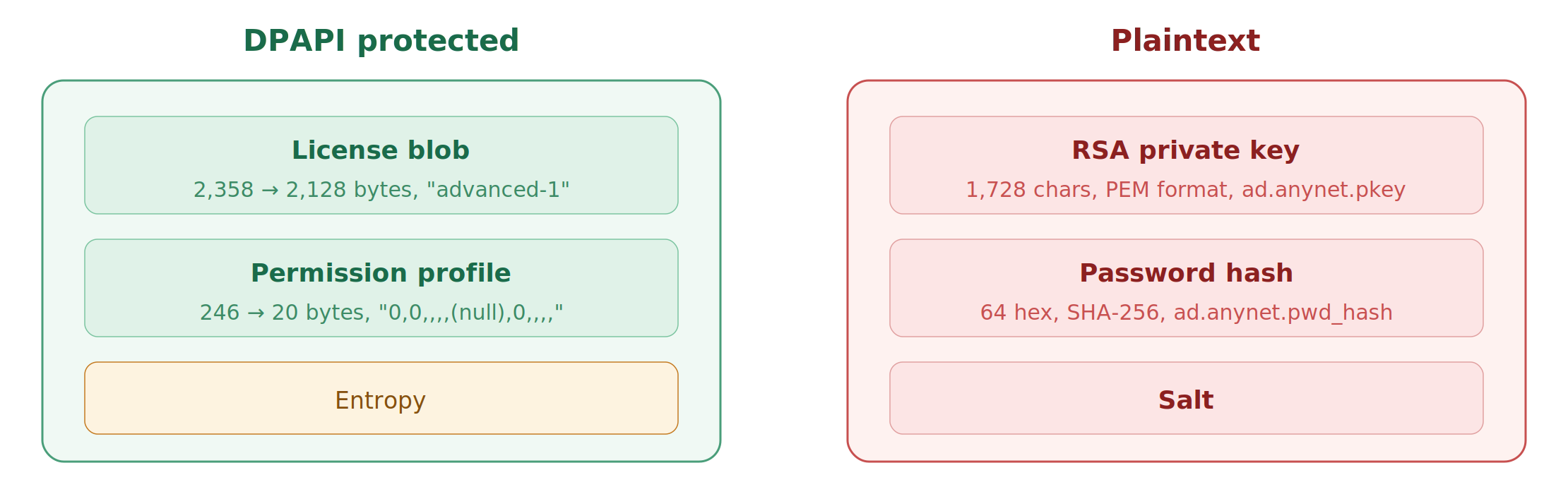
This was unexpected, DPAPI is used for the license, not for credentials:
| field | encrypted size | decrypted size | content |
|---|---|---|---|
ad.license.state_store | 2,358 B | 2,128 B | "advanced-1" + license metadata |
| permission profile | 246 B | 20 B | 0,0,,,,(null),0,,,, |
| RSA private key | // | // | Not protected by DPAPI, it’s plaintext PEM. |
The password and RSA private key are stored as plain text in service.conf. No encryption. I also noticed that AnyDesk decrypts the DPAPI blobs, then immediately re-encrypts them with fresh DPAPI parameters. The blobs change on every boot, but the underlying data stays the same. This is standard DPAPI behavior, the encrypted output is non-deterministic because DPAPI adds random padding.
Hardcoded DPAPI entropy string
This is the most interesting finding from the Frida trace. AnyDesk passes a hardcoded entropy string as [REDACTED] to every DPAPI call:
1
[REDACTED]
I verified this statically in the binary:
1
2
3
4
5
p = data.find(b'[REDACTED]')
if p >= 0:
    va = file_offset_to_va(p)
    print(f"offset 0x{p:08X}, VA 0x{va:08X}")
    print(f"length {len(b'[REDACTED]')} bytes")
I searched this string, found zero results. it has never been published anywhere.
This is IMPORTANT:
When performing offline DPAPI blob decryption, for example, during disk forensics using Mimikatz or DPLoot, you typically need two things:
- The DPAPI master key
- The optional entropy parameter
Without the entropy string, CryptUnprotectData will fail even with the correct master key. No one has published this value before, so existing forensic tooling can’t decrypt AnyDesk’s DPAPI blobs offline.
Network hooks
I also hooked connect, send, and recv in the Frida spawned process. But there were bo network activity at all from the GUI process.
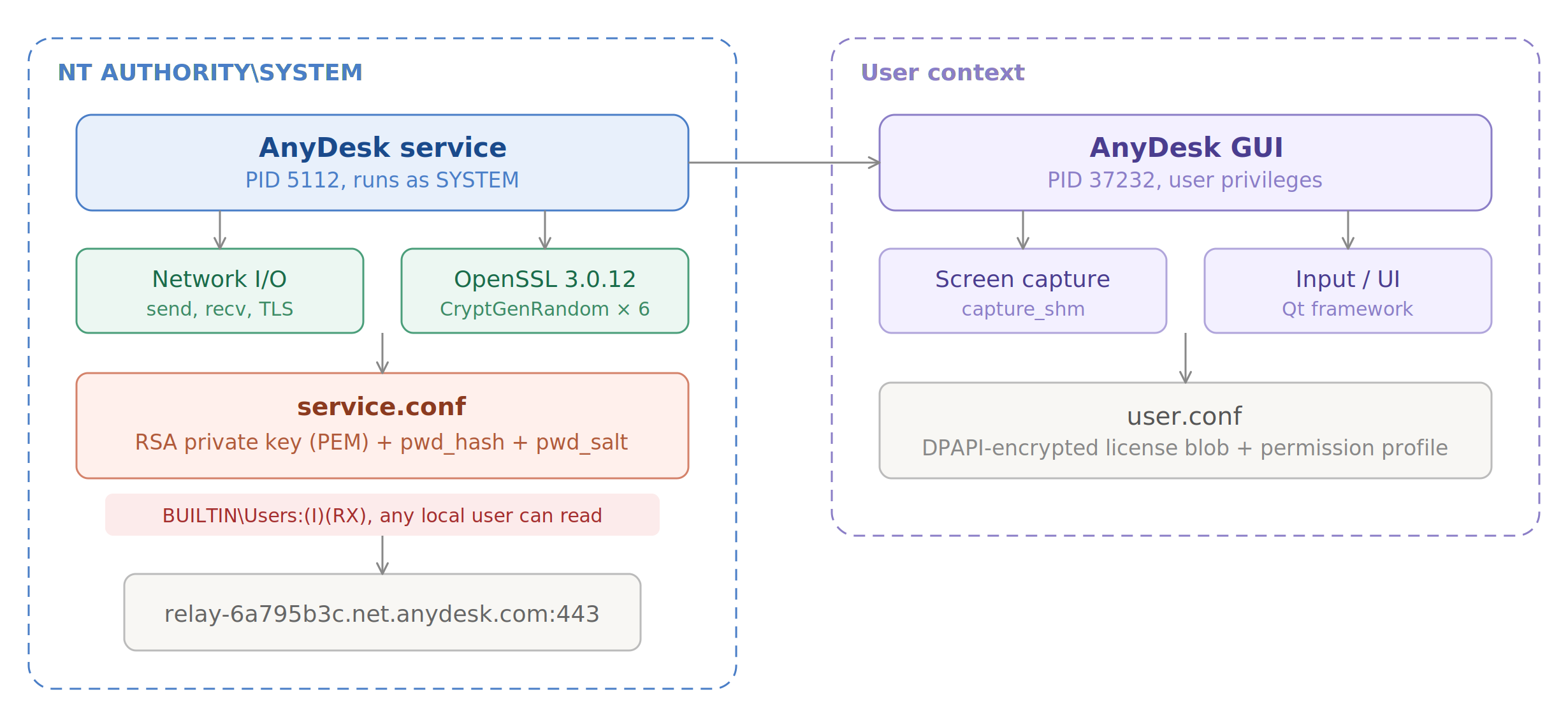
This is probably because AnyDesk uses a multi process architecture, the GUI runs in the user’s session, but all network I/O happens in a separate service process (different PID, runs as SYSTEM). They communicate via IPC shared memory objects.
Behavioral analysis
Process Monitor captures every file, registry, and network operation from a process. I recorded a full AnyDesk session, startup, connection, file transfer, disconnect.
Relay connection
ProcMon’s network tab shows AnyDesk connecting to a single relay server:
1
relay-6a795b3c.net.anydesk.com:443
All remote connections go through AnyDesk’s relay infrastructure over TLS.
The AnyNet protocol
Through exhaustive string extraction and cross-referencing with disassembled code, I mapped AnyDesk’s proprietary communication protocol.
Message Type Extraction
AnyDesk registers every message type with a _msg_t suffix string. I wrote a script to extract all of them:
1
2
3
4
5
6
7
8
9
10
11
12
13
14
15
msg_types = set()
p = 0
while True:
    p = data.find(b'_msg_t\x00', p)
    if p < 0: break
    start = p
    while start > 0 and 32 <= data[start-1] < 127:
        start -= 1
    name = data[start:p+6].decode('ascii')
    if len(name) > 7:
        msg_types.add(name)
    p += 1

for name in sorted(msg_types):
    print(f"{name}")
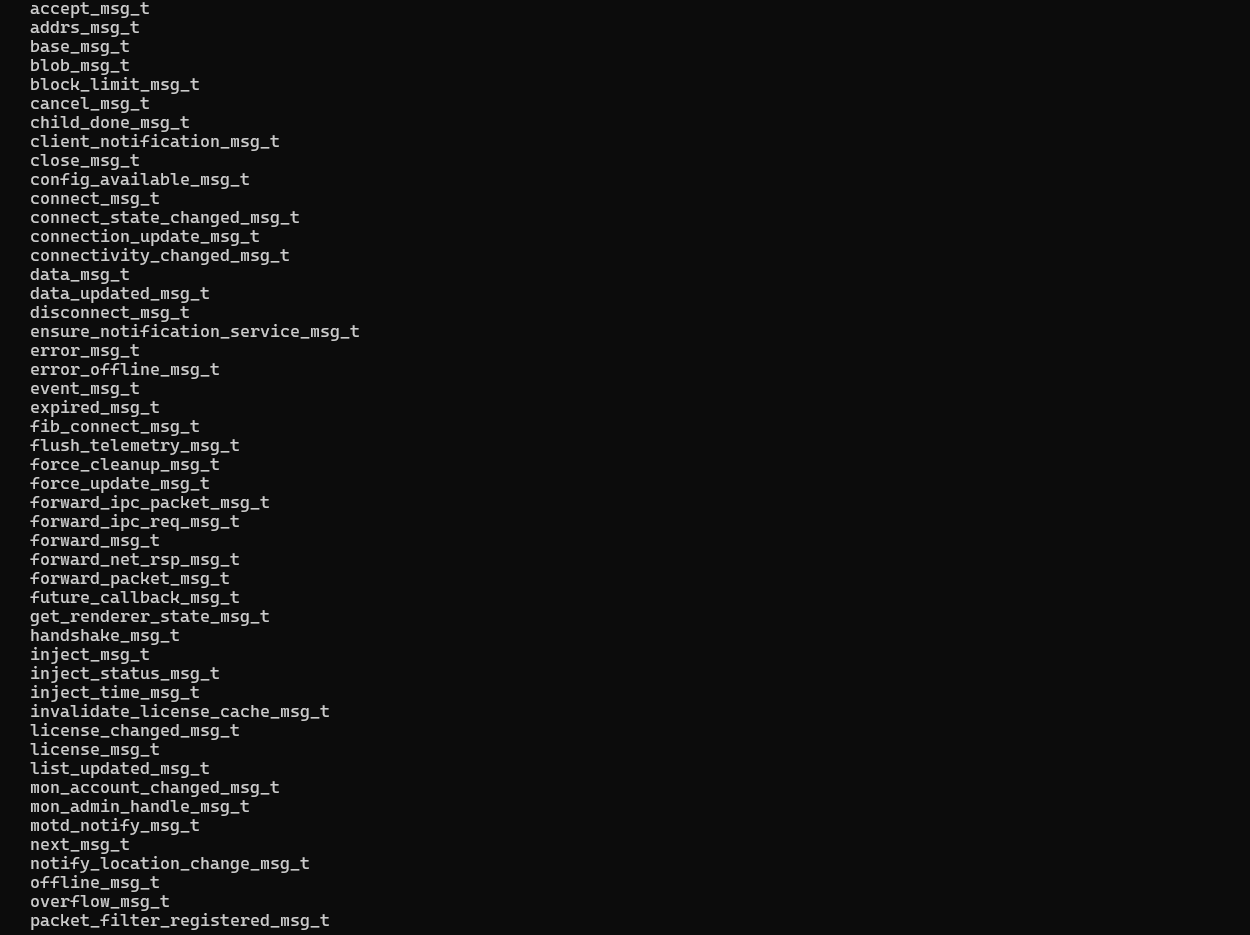
86 message types identified.
Network Layer Messages
These handle raw data transport between nodes:
1
2
3
4
5
packet_msg_t                    send_packet_msg_t
send_blob_msg_t                 send_prefixed_packet_msg_t
recv_msg_t                      disconnect_msg_t
overflow_msg_t                  close_msg_t
data_msg_t                      blob_msg_t
Connection management
Connection lifecycle from discovery through established session:
1
2
3
connect_state_changed_msg_t     relay_connect_msg_t
reconnect_msg_t                 handshake_msg_t
accept_msg_t
Session queue
AnyDesk’s session management supports queuing when the remote user isn’t available:
1
2
session_queue_action_req_msg_t  session_queue_init_msg_t
session_queue_upd_msg_t         session_queue_session_closed_msg_t
IPC forwarding
Messages that bridge the GUI process and the service process:
1
2
forward_packet_msg_t            forward_ipc_req_msg_t
config_available_msg_t
TCP tunneling
AnyDesk supports TCP port forwarding through its tunneling feature:
1
2
tcp_tun_accept                  tcp_tun_client
tcp_tun_connect                 tcp_tun_server
Screen capture
Screen data is shared between processes via named shared memory:
1
2
3
capture_shm                     capture_pool_%u_shm
capture_mtx                     capture_frame_evt
dwm_status_shm                  dwm_%u
The %u format specifiers indicate dynamic naming based on runtime values.
Auxiliary
1
2
3
license_msg_t                   timer_msg_t
quit_msg_t                      event_msg_t
future_callback_msg_t
RPC methods
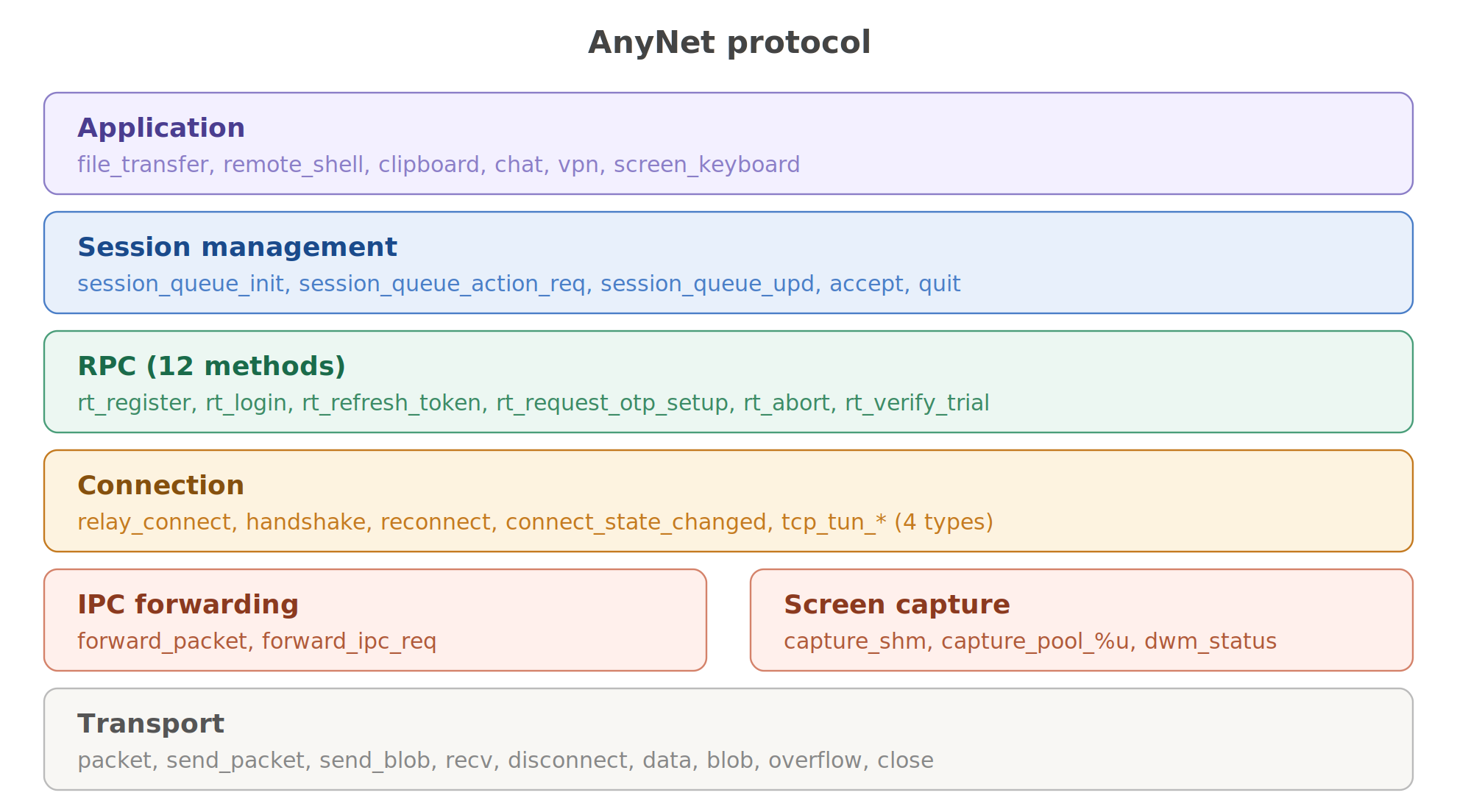
I found 12 RPC method names used for relay-server communication:
1
2
3
4
rt_register              rt_request_login         rt_login
rt_reset_password        rt_request_otp_setup     rt_request_otp_remove
rt_user_action_req       rt_abort                 rt_invalid
rt_account_info          rt_refresh_token         rt_verify_trial
The rt_ prefix likely stands for “relay transport” or “remote transport” (i don’t know, try to take a guess). The methods map to the expected remote access workflow:
rt_register→ register this AnyDesk instance with the relayrt_login→ authenticate with credentialsrt_refresh_token→ session token renewalrt_request_otp_setup&rt_request_otp_remove→ 2FA authentication managementrt_verify_trial→ trial license verification
Session error codes
The function at VA 0x101F68D0 contains a mapping from HRESULT error codes to human readable strings. I extracted 30 error codes:
1
2
3
4
5
6
7
8
desk_rt_auth_failed                         desk_rt_acl_denied
desk_rt_protocol_error                      desk_rt_internal_error
desk_rt_two_factor_auth_failed              desk_rt_lockdown
desk_rt_rejected_no_license                 desk_rt_kicked
desk_rt_vpn_not_supported                   desk_rt_file_transfer_not_supported
desk_rt_remote_shell_not_supported          desk_rt_session_queue_full
desk_rt_auto_disconnect                     desk_rt_ipc_error
desk_rt_feature_not_supported_on_terminal_server
HRESULT error system
AnyDesk uses HRESULT error codes for its serialization engine. The facility codes I identified:
| range | facility | purpose |
|---|---|---|
0xA000xxxx | serialization | buffer boundary errors, serialize and deserialize failures |
0xA001xxxx | network | protocol version mismatches, disconnections |
Full error code table:
| HRESULT | name | description |
|---|---|---|
0xA0000001 | write_boundary_error | attempted write past buffer end |
0xA0000002 | read_boundary_error | attempted read past buffer end |
0xA0000003 | serialize_error | failed to serialize message |
0xA0000004 | deserialize_error | failed to deserialize message |
0xA0000005 | factory_error | message factory couldn’t create type |
0xA0010004 | interproc_remote_version_too_new | remote uses newer protocol |
0xA0010005 | interproc_remote_version_too_old | remote uses older protocol |
0xA0010A01 | anynet_disconnected | connection to relay lost |
Serialization engine
The core serializer lives at VA 0x102FB550. I checked its security by counting bounds check references:
1
2
3
4
5
6
7
8
9
10
def count_string_xrefs(needle: bytes) -> int:
    p = data.find(needle)
    if p < 0: return 0
    va = file_offset_to_va(p)
    va_bytes = struct.pack('<I', va)
    return text_data.count(va_bytes)

sanitize = count_string_xrefs(b'SANITIZE')
check_range = count_string_xrefs(b'check_range')
may_edit = count_string_xrefs(b'may_edit')
Every buffer access goes through explicit range validation. the serializer tracks both the current position and the buffer boundaries, checking before every read or write. Exploiting the deserialization path would require bypassing hundreds of individual bounds checks and each one independently validated. This is good. i saw that many applications have zero bounds checking in their serializers and rely on higher-level length fields that can be manipulated
Connection architecture
From the default configuration:
1
2
ad.anynet.conn_methods=connect:443;connect:80;socks:443;
direct:443;direct:80;direct:6568
AnyDesk tries connection methods in this order:
- relay on port 443
- relay on port 80 (fallback probably)
- SOCKS proxy on port 443
- P2P on ports 443, 80, and 6568
Other interesting config keys extracted from defaults:
1
2
3
4
5
6
7
8
ad.anynet.direct=true
ad.anynet.keepalive=false
ad.discovery.enabled=true
ad.discovery.multicast_ip=239.255.102.18
ad.features.two_factor_auth
ad.anynet.auth_disabled=false
ad.security.update_channel=main
ad.security.update_check_interval=32400
IPC architecture
The GUI and service processes communicate through named shared memory objects:
1
2
3
4
5
6
ipc_shm_client
qipc_shm_svc_evt
qipc_shm_svc_mtx
qipc_shm_svc_alive
qipc_shm_svc_ret_evt
qipcshm_%u_%u_%u
The qipc prefix means that Qt’s IPC implementation (AnyDesk uses Qt for its GUI). The %u_%u_%u naming format includes runtime-generated values, process ID, a counter, and a channel identifier.
the shared memory objects are created with CreateFileMappingW using NULL security attributes, but session isolation between Session 0 (service) and Session 1+ (user) prevents cross session access.
Cracking the password hash
service.conf
1
2
3
4
ad.anynet.pkey=-----BEGIN RSA PRIVATE KEY-----\n<REDACTED>\n-----END RSA PRIVATE KEY-----
ad.anynet.pwd_hash=<64 hex characters>
ad.anynet.pwd_salt=<32 hex characters>
ad.anynet.cert=-----BEGIN CERTIFICATE-----\n<REDACTED>\n-----END CERTIFICATE-----
64 hex characters for the hash, which is 32 bytes = SHA-256 output length. I had a legit question, what exactly is the input to SHA-256?
Brute-force
I wrote a script that helped me to write a script that tries every plausible hash scheme:
1
2
3
4
5
6
7
8
9
10
11
12
13
14
15
16
17
18
19
20
21
22
23
24
25
26
27
28
29
30
31
32
33
34
35
36
37
38
39
40
41
42
43
44
45
46
47
48
import hashlib, hmac

pw = b"<REDACTED>"
salt = bytes.fromhex("<REDACTED>")
expected = "<REDACTED>"

def prova(nome, valore):
    if valore == expected:
        print("[MATCH]", nome)
    else:
        print("[ ]", nome)

test = [
    ("SHA256(pw+salt)", hashlib.sha256(pw + salt).hexdigest()),
    ("SHA256(salt+pw)", hashlib.sha256(salt + pw).hexdigest()),
    ("SHA256(pw)", hashlib.sha256(pw).hexdigest()),
    ("SHA1(pw+salt)", hashlib.sha1(pw + salt).hexdigest()),
    ("MD5(pw+salt)", hashlib.md5(pw + salt).hexdigest()),
]

test2 = [
    ("HMAC-SHA256(salt,pw)", hmac.new(salt, pw, hashlib.sha256).hexdigest()),
    ("HMAC-SHA256(pw,salt)", hmac.new(pw, salt, hashlib.sha256).hexdigest()),
    ("PBKDF2(1)", hashlib.pbkdf2_hmac('sha256', pw, salt, 1).hex()),
    ("PBKDF2(1000)", hashlib.pbkdf2_hmac('sha256', pw, salt, 1000).hex()),
    ("PBKDF2(10000)", hashlib.pbkdf2_hmac('sha256', pw, salt, 10000).hex()),
    ("scrypt(1024)", hashlib.scrypt(pw, salt=salt, n=1024, r=1, p=1, dklen=32).hex()),
]

pw16 = pw.decode().encode('utf-16-le')
test3 = [
    ("SHA256(pw16+salt)", hashlib.sha256(pw16 + salt).hexdigest()),
    ("SHA256(salt+pw16)", hashlib.sha256(salt + pw16).hexdigest()),
]

test4 = [
    ("BLAKE2b(pw+salt)", hashlib.blake2b(pw + salt, digest_size=32).hexdigest()),
    ("BLAKE2s(pw+salt)", hashlib.blake2s(pw + salt).hexdigest()),
    ("BLAKE2b(key=salt)", hashlib.blake2b(pw, key=salt, digest_size=32).hexdigest()),
]

test5 = [
    ("SHA256(pw+0+salt)", hashlib.sha256(pw + b'\x00' + salt).hexdigest()),
    ("SHA256(salt+pw+0)", hashlib.sha256(salt + pw + b'\x00').hexdigest()),
]

for nome, valore in test + test2 + test3 + test4 + test5:
    prova(nome, valore)
The null terminator was the answer:
1
SHA256(pw + \x00 + salt)
The schema
1
2
3
4
def anydesk_hash(password: str, salt_hex: str) -> str:
    return hashlib.sha256(
        password.encode('utf-8') + b'\x00' + bytes.fromhex(salt_hex)
    ).hexdigest()
The null byte between password and salt acts as a C-string terminator, the password is probably passed as a null terminated string internally, and the salt is appended after the terminator. This is a common pattern in C/C++ code where strlen() is used to get the password length, then the salt is copied after the null terminator.
One round of SHA-256 and no key stretching.

Update mechanism
AnyDesk checks for updates at https://anydesk.com/update every 9 hours. The download happens through the AnyNet relay protocol (TLS-encrypted), and installation uses msiexec.exe or AnyDesk.exe --install.
zero Authenticode verification APIs exist in the binary. after downloading an update, AnyDesk doesn’t verify the code signing signature before executing it
1
2
3
4
5
6
7
8
9
10
11
12
13
14
verify_apis = [
    'WinVerifyTrust',
    'CryptVerifySignature',
    'CertVerifyCertificateChainPolicy',
    'CryptQueryObject',
    'MsiVerifyPackageW',
    'CryptVerifyMessageSignature',
]

for api in verify_apis:
    in_iat = any(n == api for n in iat.values())
    in_binary = api.encode() in data
    print(f"{api}: IAT={'yes' if in_iat else 'no'}, "
          f"string={'yes' if in_binary else 'no'}")
1
2
3
4
5
6
WinVerifyTrust: IAT=NO, String=NO
CryptVerifySignature: IAT=NO, String=NO
CertVerifyCertificateChainPolicy: IAT=NO, String=NO
CryptQueryObject: IAT=NO, String=NO
MsiVerifyPackageW: IAT=NO, String=NO
CryptVerifyMessageSignature: IAT=NO, String=NO
The transport level TLS provides integrity during download, and Windows Installer verifies MSI packages during installation. But AnyDesk trusts whatever arrives through the relay. The impact is limited by TLS transport security and Windows Installer’s built-in verification, but the best practice is to verify signatures regardless.

Conclusions
If you’ve made it this far, thank you for reading the post. If you skipped to the end, go back up and read it.
If you have any questions or need clarification, you can contact me at this email address: berardinellidaniele@protonmail.com